SyllabusSync: Canvas-Integrated Smart Calendar
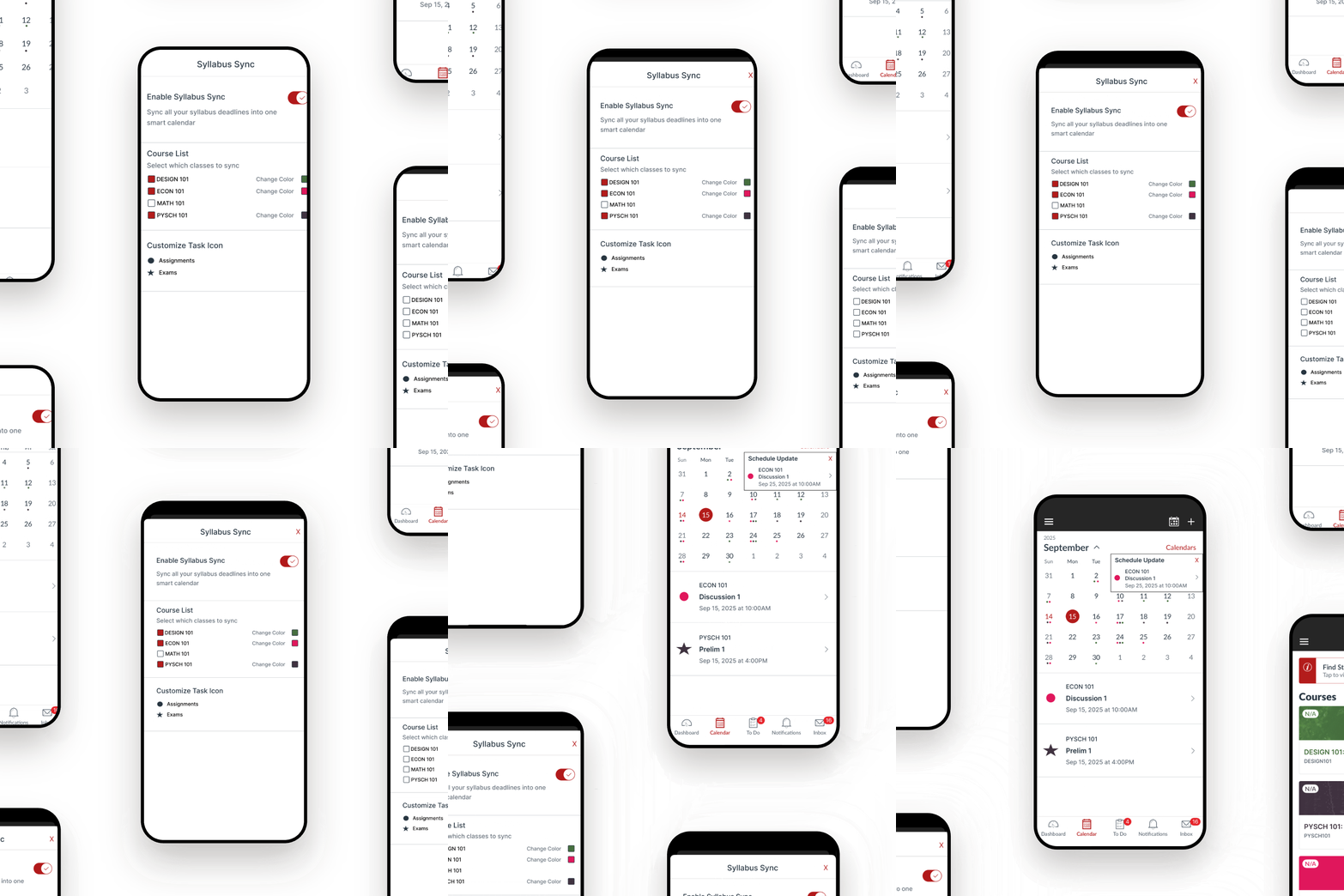
SyllabusSync automatically reads deadlines from syllabi, creating a customizable Canvas calendar with colors, icons, and real-time alerts. This redesigned experience eliminates the need for manual tracking and helps students stay on top of their coursework effortlessly.
🔗
Problem Overview
Canvas currently relies on professors to upload assignments manually to the Assignments section, but many professors don’t do this, they simply post a PDF syllabus containing all deadlines instead.
Each syllabus uses a different format, meaning students must open 5-6 separate syllabi every week just to double-check due dates. This process wastes time, causes confusion, and leads to missed assignments.
To stay organized, students often resort to Excel sheets, Notion pages, or Notes apps, spending about 2 hours at the start of every semester copying deadlines by hand.
How I Got to the Solution
Identifying the Problem
-
Deadlines Hidden in PDFs: Professors list due dates in syllabi rather than Canvas.
-
Manual Effort: Students must retype all deadlines for each class.
-
No Consistency: Every syllabus looks different — some use tables, others paragraphs.
Research and Insights
User interviews with five Cornell students revealed consistent pain points and frustrations:
-
Constant Syllabus Checking: Students reported opening and scrolling through multiple syllabi weekly just to confirm deadlines.
-
Time-Consuming Setup: Every semester, students spend about two hours building personal trackers in Notion, Excel, or Notes to stay organized.
-
High Mental Load: The lack of a single source of truth made students anxious about missing deadlines and overwhelmed by scattered information.
"I check six syllabi a week because professors never upload assignments to Canvas." – 19, College Student

"I waste so much time setting up my Notion just to keep up with assignments." – 22, College Student
"If Canvas just pulled dates from the PDF syllabus, it would fix everything." – 20, College Student


Prototyping and Iteration
Proposed Features
After early prototypes, I prioritized three key features for their feasibility and impact:
-
Smart Calendar: Auto-imports deadlines from syllabus PDFs, color-coded by class.
-
Control Center: Lets users toggle classes, assign colors/icons, and customize alerts.
-
Update Popups: Notifies students instantly when professors modify deadlines.


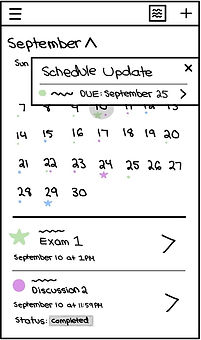
Low Fidelity Prototype — Students’ classes, deadlines, and updates organized automatically in one place
User Testing
To evaluate how students preferred seeing updated information, I tested three different versions of the Schedule Update popup with five users:
-
Version A: Symbol, class name, assignment name, and due date with time.
-
Version B: Symbol, assignment name, and due date.
-
Version C: Symbol, class name, and due date.

Version A

Version B

Version C
-
All 5 users preferred Version A, noting that it provided the most helpful detail without requiring extra clicks.
-
They valued seeing both the class and assignment name at a glance to quickly understand what changed.
-
With Version A, students felt confident their calendars reflected the latest, most accurate information.
The Final Design
Key Features
-
Advanced Integration: Canvas calendar automatically syncs with syllabus deadlines.
Customization: Users can assign colors, icons, and toggle classes easily.
Update Popups: Display detailed, real-time changes from professors.

Entry Point: Tap the SyllabusSync icon in the top-right menu to access your smart, auto-updating Canvas calendar

Control Center: Select which classes to sync, assign colors and icons, and set permissions
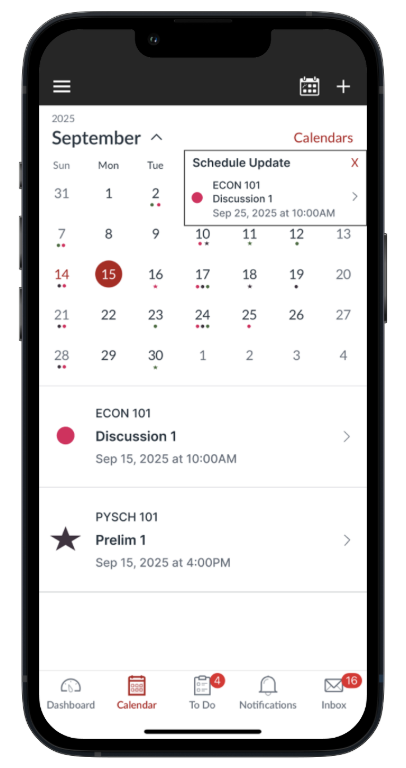
Schedule Update: Get instant alerts when professors change deadlines, your calendar updates automatically, keeping you on track
Entry Point: Tap the SyllabusSync icon in the top-right menu to access your smart, auto-updating Canvas calendar
Design Flow Video

Impact and Future Directions
Impact
While this is a hypothetical project, the design and user testing results indicate strong potential for improving the academic experience:
-
Saves Setup Time: From 2+ hours to under 2 minutes.
-
Reduces Stress: Eliminates the need to check 6+ syllabi weekly.
-
Prevents Missed Deadlines: Ensures all assignments are visible and accurate in one place.
SyllabusSync reimagines Canvas as a central, automated, and reliable system that supports students’ organization and focus throughout the semester.
Future Improvements
-
Smart Recommendations: AI-based pattern detection for recurring tasks.
-
Shared Calendars: Enable collaboration on group projects.
-
Predictive Alerts: Notify students about potential workload spikes.